
Thursday, May 1, 2014


Monday, August 12, 2013
The OFF Pocket: Hiding Your Phone in Plain Sight
Note from Artem: Mark Murphy, also known as CommonsWare and CommonsGuy, is one of the top 10 contributors to StackOverflow (he's currently #8). He's the Chuck Norris of Android development, with over 300,000 StackOverflow reputation points. I am honored by his decision to accept my offer to join the AndroidPolice team of contributors.
The User Defense series of posts will highlight relatively easy ways in which users can improve the privacy and security of their use of Android devices.
People sometimes worry about so-called "tracking cookies" that allow marketers to effectively spy on their Web surfing. Your smartphone is more or less a tracking cookie for the physical world, with everything from shopping malls to recycling bins tracking your movements.
Needless to say, some find this to be unnerving. Switching to airplane mode, or turning off your phone, in theory will stop this tracking. However, turning a phone off and on is rather slow, andthere are concerns over whether everything truly shuts off in either case.
The OFF Pocket tries to address this.
Just as RFID-blocking wallets are designed to help secure your credit cards and such, accessories like the OFF Pocket aim to do the same for your smartphone. Simply sliding the phone into the OFF Pocket's sleeve is supposed to block all signals: WiFi, cellular, and GPS.
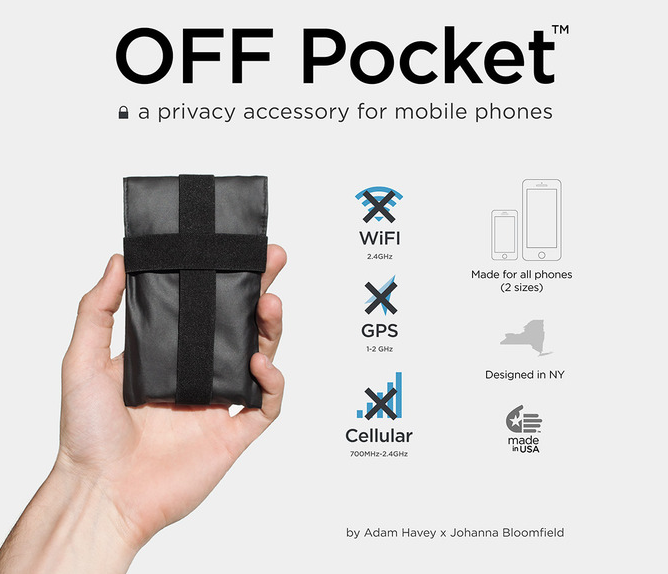
The OFF Pocket, like many new accessories, is coming from a Kickstarter campaign, led by designers with past experience in anti-surveillance products, such as the anti-drone hoodie.
(Yes, there's an anti-drone hoodie.)
The OFF Pocket campaign has already met its funding goal of $35,000, with two weeks to go.
The makers of the OFF Pocket claim 100dB drop in signal strength (translation: it blocks signals really well), and it is certainly more convenient than carrying around a cocktail shaker or refrigerator for shielding your phone. On the other hand, it would be nice if there were a bit more independent testing of these claims, as at $85 for new Kickstarter backers, it is not inexpensive. With the right apps, it would be possible for a buyer to make some basic confirmations about signal strength as seen by the pocketed device, but, of course, that would be after the OFF Pocket was purchased.
The OFF Pocket will come in two sizes, with the larger size being suitable for a wide range of Android phones, though it's unclear if it will be large enough for phablets like the Samsung Galaxy Note series.
The OFF Pocket is not the first product of its kind, as Disklabs Faraday Bags, among others, has had similar products for a while, making similar claims. However, the OFF Pocket happens to be arriving on the scene at an interesting time.
Ideally, these sorts of accessories would not be needed. That being said, the OFF Pocket and similar products should offer device owners greater control over when their device is visible to the world and, therefore, subject to tracking.
Source: Kickstarter, OFF Pocket
Google Maps places ads in search results: annoying or justified?
Google has recently integrated ads right into their free service, Google Maps. Even apps belonging to the huge conglomerate are not immune to cancellation, as we recently experienced with Google Reader. Though I don't think this would happen in a million years, this could be a way for the loved service to reduce their chances of joining the cemetery of scrapped projects, like Google Health and Google Talk. Is this simply a way of monetizing Maps to keep it afloat or just a major pain in the derriere because the ads, which are presented first in the results list, might not be the cheapest or closest ones to your present location.

The ads will be clearly labeled and function exactly like anything else Maps searches bring up. This means you pull it up to see the company details which include phone number, website and directions. These ads will appear when you input a query for any sort of general business. Google's argument is that they will only post these when it seems like it is relevant to the user's current location or search entry. That being said, the ad result could potentially not be your best possible option for the nearest service to you. This new campaign is in addition to the highlighted businesses that Google places on its maps once that company has paid them to do so.
Is this really helpful for the user though? In a funny joke I read today, they described the relationship between Google and you, stating that since you aren't actually paying for the service, you're not actually its customer and in fact, you're the product. Google uses your search entries and location to try and sell you stuff, which we've been aware of for a long time. Now they’re just doing it a little more overtly.
Do these new ads make you cringe or is it just the next logical step in mobile monetization?
Zebra Paint Coloring App - easy for kids!

Rating
Good👍
- ✓easy to use
- ✓quick to learn
- ✓child-friendly
Bad👎
- ✕not enough images after a while of using this app

| TESTED ON | ANDROID VERSION | ROOT | MODIFICATIONS | TESTED VERSION | LATEST VERSION |
| Samsung Galaxy Tab 10.1 | 4.2.2 | Yes | CyanogenMod | 1.7 | 1.7 |
Smartphones and tablets are magical to children. For those times when you are playing with your kids, there exist a lot of child-friendly apps. From experience, kids just love to paint on tablets. TheZebra Paint Coloring App is basically very similar to painting by numbers. We tested it out for you today!
Features & Use
When I'm out, there are three devices that I always have: my phone, my tablet and my Playstation Vita. Games are installed on all three devices and unfortunately, not all are suitable for children. Either the games are much too brutal or require a lot of practice (like R-Type). Children get really happy when they paint on a tablet, at least from my experience so far. Icon apps are a dime a dozen, but what I was looking for was a kind painting by numbers and finally I came across theZebra Paint Coloring App.

The functionality of the app is very simple: there are ready-made blank images. You basically ''fill" them in. You choose a suitable color, tap on the blank space and it is fills automatically. Certainly not the pinnacle of creativity, but works great for kids. With my young co-testers, I added a lower age limit of about 4-5 years, although of course this is optional. The app is very simple and after a briefly explaining it to the younger test assistants, they were ready to get to work all by themselves.

In the left sidebar, you'll see the five most recently used colors. Below you can access the color palette icon which provides different colors and patterns. There is a pencil icon for new templates, while the disk icon saves the "masterpiece" in the gallery of the device. The functionality of the app is intentionally not overloaded so that children can actually operate it smoothly without help. Only the colors in the color palette are not always self-explanatory at first glance.

Screen & Controls
The layout of the app is described above in the last category. In terms of controls, the icons in theZebra Paint Coloring App are kept nice and big on the Galaxy Tab 10.1, and thus very suitable for children's fingers, making easier for them to choose. The controls are very simple and even small children can quickly cope with the app.
Speed & Stability
The Zebra Paint Coloring App app ran very smoothly on the Galaxy Tab 10.1. Scrolling through the picture templates works smoothly and the loading times only lasted a few seconds. I also didn't run into any stability problems.
Price/Performance Ratio
The Zebra Paint Coloring App has 40 images available for free in the Google Play and contains no ads or in-app purchases that could accidentally be activated by children. With the Zebra Paint Pro Painters app, there's 100 frames for just over a dollar. Though this is a fair price, the free, ad-free version is also great!
Final Verdict
Children are able to play the Zebra Paint Coloring App for a few solid hours, but the creativity aspect is a bit too restricted. The simple filling of the image areas is quickly learned and mastered and entertains children who will have a great time. The simple controls make the app 100% suited for children. Parents will small children should definitely think about getting this app, which would spark some creativity.
Comparable Apps
No comparable apps are currently known to us. If you happen to know one, it would be great if you could get in touch with us.
Android 4.2.2 for HTC One X+ starts rolling out
While HTC has been on the hot plate in regards to Android updates, most notably with their lack of support for the HTC One S, there is a silver lining for those who have the HTC One predecessor in their repertoire. The update to 4.2.2 is being rolled out in Taiwan for the HTC One X+. For those who cannot wait for an official update to arrive to their devices, there is a system image and custom ROM also available.

The update to Android 4.2.2 brings some noticeable changes, including the Sense 5 UI and flashing feed tray. In addition, users may expect some small software changes within the device, much along the lines of the HTC One. Here’s a complete list from Android Police in regards to the changes:
HTC One X + Software Wireless Updates | 2.17.709.2HTC Sense version: 5
Android version: 4.2.2 (Jelly Bean)
Software Number: 2.17.709.2
Updated: August 8, 2013 This update includes the following new features and performance improvements:System improvementsHTC Sense 5 and Android 4.2.2 upgrade
New HTC BlinkFeed Home
New lock screen style: electronic gadgetsPower improvementsAdded display the battery meter in the status bar options
New sleep mode switchNotifications panel improvementsQuick Settings panel: use two-finger gestures with 12 sliding open the Notifications panel fast settingPhoto Gallery / Camera improvementsAE / AF lock: Long tap the screen shot on the screen to start the exposure / focus lock function
Video Highlights living micro film: With 12 kinds of styles of music theme, automatically edited into a stunning 30 seconds videoMusic improvementsMusic Channel: You can view the lyrics and music visualization screen * (* support content based on actual lyrics database shall prevail)HTC Sense InputSupport more Chinese words
A small note: The OTA Update is only compatible with devices that have the name HTC_621., so not the AT&T models.

For those who can’t wait, the system image for a custom ROM (Insert Coin) can be downloaded over at the XDA Developers forums (please note, that the system image is only compatible with the international version of the HTC One X+, again AT&T, you’re left in the dark here).
Google to launch Motorola Nexus by year end?
A new Nexus device is on the horizon. As in the past, the end of the year is the usual time for Google to announce either Android updates or a Nexus device launch and we’re fast approaching the limit. Speculation has been abuzz about who will release the device and whether it will fall into the laps of LG, ASUS, or someone else. However, some insider information has revealed that Motorola may be the next contender for the Nexus name tag.

Taylor Wimberly, someone who has already provided some pretty accurate information in regards to the Moto X, has released a post on his Google+ page that Motorola will be the next contender for the Nexus line. What more, the new device will not be based on the Moto X but will be something new all together.

While this is only one source and we’ve already erred on the side of caution when it comes to this kind of stuff, it does seem plausible that Motorola would be a contender for a Nexus device. While being under the reigns of Google, wouldn’t it be awesome to see something come from the two of them that would have the same kind of cutting edge technology we’ve expected from previous Nexus reveals?
As more information arises, we’ll stay on it. For now, let’s just safely realize that Motorola may or may not be a contender. However, I’d be pleased as punch if they did end up getting to do it.
Expect over a million malicious Android apps by 2014
Anyone who has been following the steady growth of Android should be a little impressed by the constantly rising statistics. However, the rapid spread and popularization of the Android operating system has its share of downfalls: most notably the number of malicious apps and exploits that are out there. In fact, by the end of the year, there’s expected to be over a million malicious apps.

With a larger and larger percentage of the mobile operating system market share, Android isstarting to become more and more attractive to programmers and hackers alike. With almost 80% of the global smartphone market share and the Google Play Store providing more apps that Apple’s App Store since the beginning of the year, it’s no wonder it’s getting more attention.
However, a malware problem has followed along with this rapid growth and we see reports of it time and time again as the days go on. A report down by cyber analysts Trend Micro, has made the call out that we should expect over a million malicious Android apps the be out there by the end of the year. Most of these apps mimic the design of popular apps, but their goal is to prominently push expensive additional services (44 percent of malicious apps out there) or steal private data (24 percent).
A major problem with the rapid increase of the malicious apps, combined with the relatively high openness of the Android system, is the lack of security consciousness by many Android users (…or really, security ignorance). The installation of anti-virus software is an important step towards the safety of your mobile device, but one that isn’t heeded as often as it should. To add to the problem, the number of malware apps that are disguised as anti-virus software has increase exponentially over that last little while as well!

So, what can you do? In fact, the installation of an anti-virus program is not always necessary. In most cases, common sense and a good deal of caution and skepticism is enough. You should always check all the permissions you are giving apps before installing them and if you find something a little wonky, don’t install it. Google Play also provides a good gatekeeper for this kind of thing.
Safety is paramount with your mobile device and this should be true for many things in life, not just on Android. Always be aware of what you’re installing on your device and how it may access your information.
Subscribe to:
Posts (Atom)